How do you register a remote site at a master site?
In order to register another QCS site at your QCS site you will need to be the master QCS site for the contract. All remote sites are registered at the Site Management window. You can open the site management window in QCS by:
1.Starting QCS and logging in.
2.Editing the contract that you wish to add a remote site
3.Clicking on the "Import / Export" button on the toolbar.
4.Clicking on the "QCS" link in the white panel along the left side.
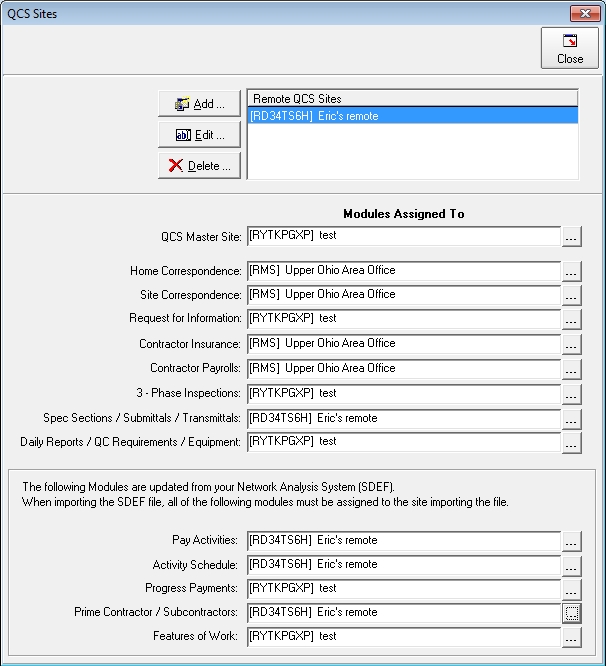
5. In the large grey area to the right of the white panel you will see, in the upper left corner, a check box titled "Will QCS be used at remote sites?". Make sure that it is checked. Once it is checked you will see a button labeled [QCS Sites]. Click on this button to open the site management window shown below.
You will notice that the site management window, [QCS Sites], will have a toolbar along the top, below the toolbar a list of the registered remote sites along with [Add], [Edit], and [Delete] buttons to manage the remote sites. Below the list of remote sites will be a list of modules that may be re-assigned and shows the current owner of the modules.
To register a remote site just click on the [Add] button and enter a name for the site and its unique site ID. The name you give is only temporary and will be overwritten by the name the remote site gave itself. That is all you need to do to register a remote site.
If you wish to assign modules to a remote site you will locate the module within the list of modules being displayed. Along the right side of the text box will be a button labeled [...]. By clicking on that button you will be presented with a series of windows that will allow you to change the assignment.
Note that the master site may "steal" a module from a remote site. We highly recommend that you do not do this but, rather, have the remote site do the assignment itself. Stealing a module will result in the loss of data from the remote site. A remote site may not steal a module but may only assign a module that it owns to other remote sites or back to the master site.